
Website visitor tracking software guide for 2026

Last update: 26 March 2026 at 05:30 pm
If your analytics says “10,000 visitors” but your pipeline says “who?” you’re leaving revenue on the table. Traditional dashboards are great at averages and trends, but they rarely tell you which accounts to call, what pages signaled intent, or how to activate that data in email and paid media.
In 2026, website visitor tracking software is shifting from “see traffic” to “take action,” with visitor tracking tools that pair identification with enrichment and workflows. That matters even more as privacy expectations rise and cookie-based tracking gets less reliable, pushing teams toward simpler setup, an intuitive interface, and seamless integration with CRM and marketing tools. Agencies feel this first, which is why tools like Radar are built to turn anonymous traffic into actionable insights without wasting valuable time.

You’ll learn how to pick the best tools in 10 minutes, the key features that separate signal from noise, how pricing and free plan options compare, and how to implement tracking safely while proving ROI.
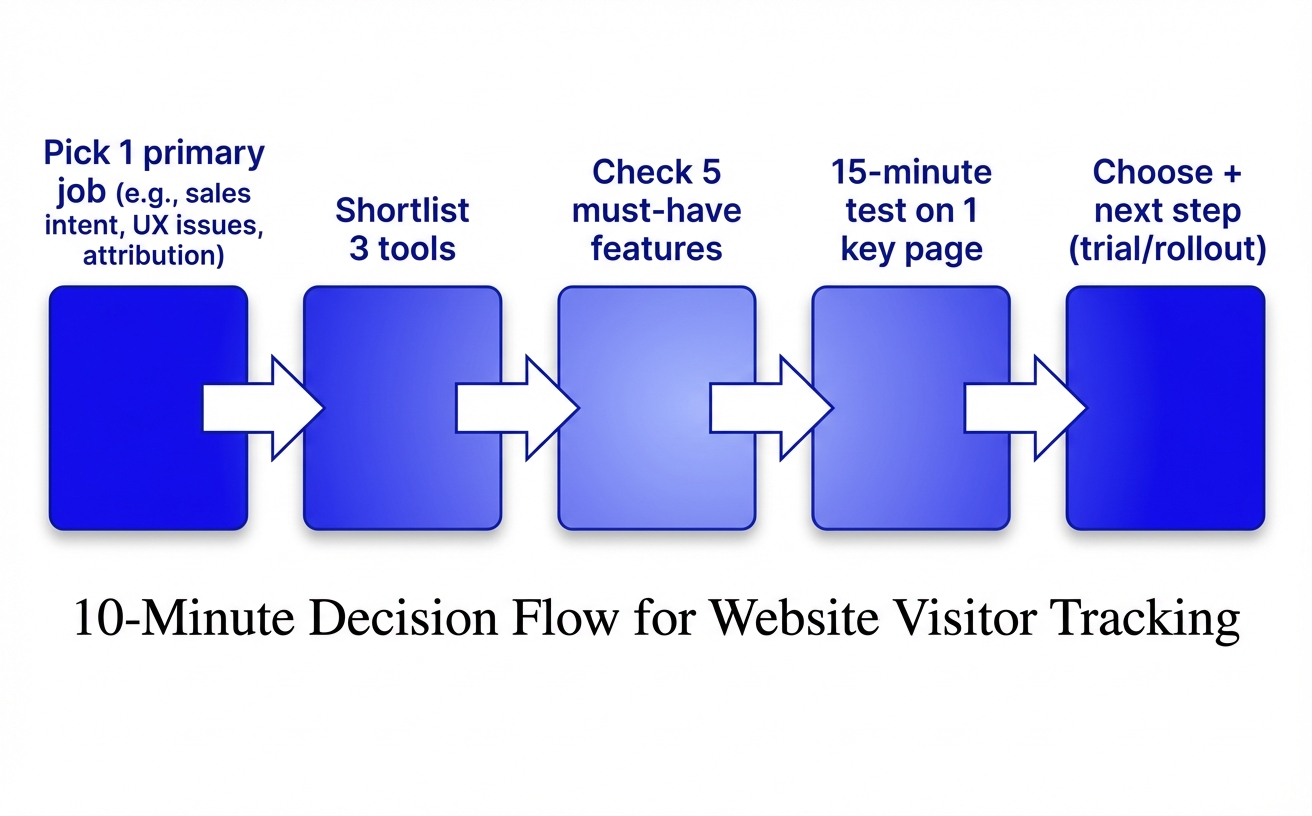
How to choose website visitor tracking software in 10 minutes
What do you actually need your website visitor tracking software to answer by the end of this week? You’ll choose faster (and save valuable time) when you pick a tool based on one primary job, then verify a short list of key features and deal-breakers. Agencies often start with “identify more of our anonymous traffic,” while product teams usually start with “fix the pages leaking conversions.” Tools like Radar fit well when you need to turn anonymous visits into actionable insights your team can qualify and route without adding process overhead.
What you want to answer: leads, UX issues, or attribution?
Lead-focused visitor tracking tools like Radar, should help you move from “someone visited pricing” to “here’s the company (or person) and what to do next.” Some platforms now go beyond analytics into identity and activation. Untitled, for example, emphasizes identity resolution plus activation across major email platforms and paid media. UX-focused tracking needs behavior evidence (session recordings, heatmaps) so you can see friction, not just bounce rates.
Attribution-focused tracking should survive cookie changes; some tools (like Cometly) highlight server-side capture to reduce loss from browser blockers. If you’re an agency, Radar is useful when you want lead identification and qualification signals without rebuilding your reporting stack.
The non-negotiables checklist for most teams
- Simple setup that your team can verify in an hour (events firing, domains correct, internal traffic filtered).
- An intuitive interface for non-analysts, so insights don’t die in dashboards.
- Seamless integration to your CRM and email/ads workflows, so tracking becomes action.
- Clear pricing with realistic paid plans (and a free plan only if it supports your core use case).
Red flags that cause bad data and wasted time
Unexplained identification claims are a red flag, because match rates vary by region and method; Leadinfo cites 35–40% identification in Europe with a cookieless option, while American alternatives can be 15–25% in the EU. “Company lists with no next step” is another red flag; MarketBetter positions its Daily SDR Playbook specifically because teams get stuck after identification. Finally, avoid tools that can’t explain how they handle consent, retention, and PII, privacy ambiguity usually turns into unusable data or rework.
Traffic analytics that stay accurate after cookie changes
Prioritize tools that reduce cookie dependency. For example, Leadinfo emphasizes cookieless tracking using IP for company identification and cites 35–40% identification in Europe (vs 15–25% for American alternatives in EU), which helps keep analytics useful when cookies get blocked.
Server-side capture can also stabilize attribution. Cometly positions server-side collection as a way to avoid browser blockers that break traditional tags and UTMs.
Behavior tracking that reveals intent, not vanity metrics
Track visitor behavior in context, not in aggregates. You want behavior views that connect time spent and navigation paths to outcomes, plus journey maps that spotlight drop off points on key pages like pricing, case studies, and signup.
When you can watch visitor sessions, you can fix what’s actually broken. Session replay and funnel views turn “bounce rate anxiety” into concrete UX and messaging changes.
Activation features that turn visits into pipeline
Activation is where tracking becomes revenue work. Tools like Untitled are built around identity resolution plus activation into major email platforms and paid media, and MarketBetter pairs identification with a “Daily SDR Playbook” so reps know who to contact and how.
For agencies, tools like Radar matter because you need speed, not dashboards. With Radar, you can turn anonymous traffic into actionable insights, trigger real time alerts or slack alerts on high-intent website activity, and route those intent signals to the right owner before the lead goes cold.
Which type of website visitor tracking software fits your stack?
A SaaS agency I worked with tried to “do it all” with one platform, then realized their sales team only needed two things: clean intent signals and fast routing into their CRM. They swapped half their tools for a simpler setup and suddenly the workflows actually got used. You’ll get better results by picking the category that matches your team, data maturity, and sales motion instead of chasing all-in-one promises.
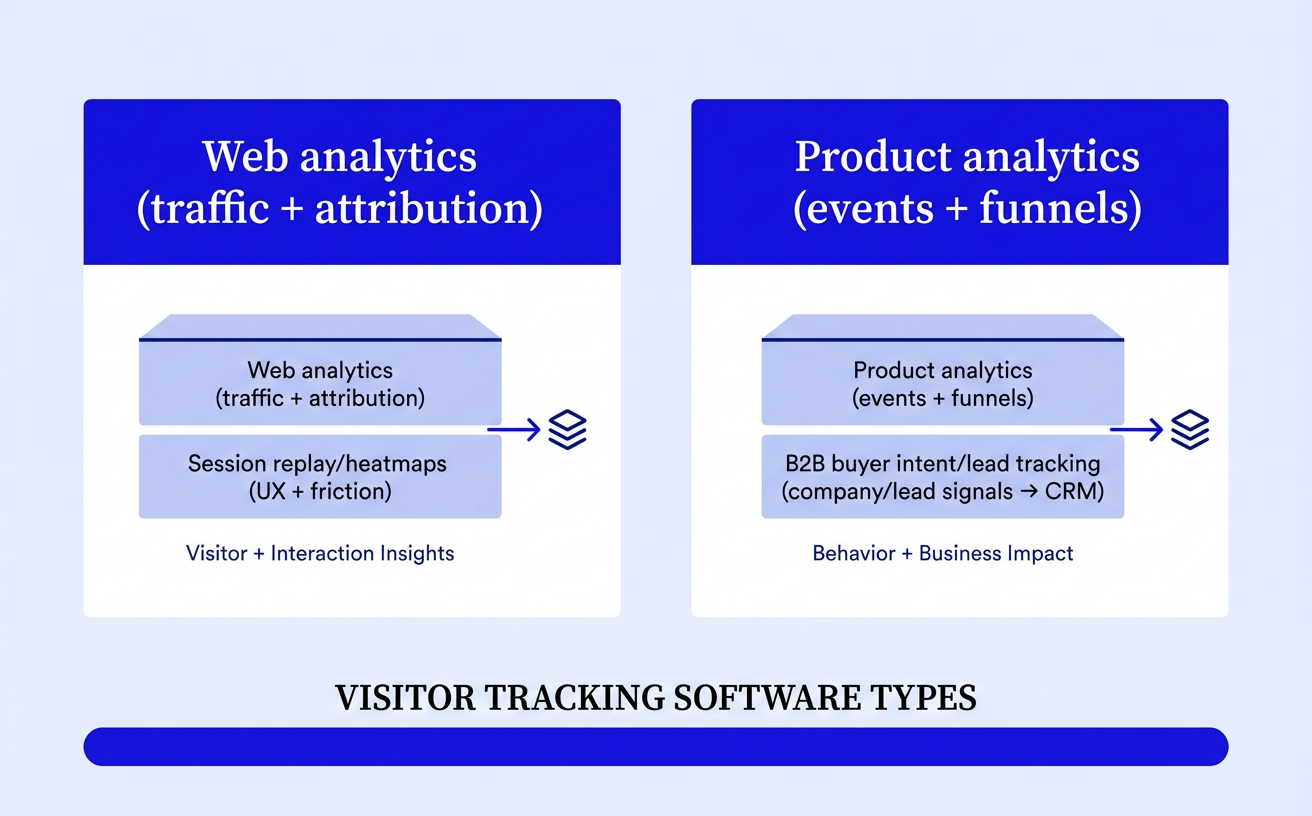
When classic web analytics is enough (and when it isn’t)
Google Analytics (and similar analytics tools) is enough when you’re answering aggregate questions like “Which channel drives demo requests?” and “Where do people drop off?” It stops being enough when you need to know who is behind high-intent visits, because classic web analytics is built for trends, not identification.
When product analytics beats marketing analytics
Product analytics wins when the “conversion” happens inside the product, like activation, feature adoption, or expansion. If you’re running a free trial or PLG motion, you’ll learn more by tracking events like “invited teammate” than by staring at pageviews, then using automation to route the right in-app signals to sales and marketing teams.
When B2B visitor identification tools pay off
B2B visitor identification pays off when outbound follow-up is part of your motion and you can act quickly. In EU markets, tools like Leadinfo report 35–40% company identification with a cookieless option and plans from €69/month, while budget options like Salespanel start around $99/month but typically trade off functionality. If you want the “what do I do next?” layer, MarketBetter positions a Daily SDR Playbook approach that prioritizes outreach tasks after identification.
When you should add a CDP or server-side tracking layer
Add a server-side layer when browser tracking is breaking your attribution and you need more reliable event capture. Cometly highlights server-side collection to reduce the impact of ad blockers and iOS changes, and a CDP can help you standardize events and integrate them cleanly across your CRM and email marketing platforms. If you’re an agency, tools like Radar can sit in the middle to turn anonymous traffic into actionable insights, then push qualified signals into your platform routing without rebuilding your entire stack.
How to implement tracking without breaking privacy or performance
Start by writing down exactly what you will track, where it will go, and who will act on it, before you add a single script to your site. A clean setup keeps website tracking useful, protects trust, and stops your data from turning into an ungoverned mess that nobody can monitor or optimize.
Set up a tracking plan your team can actually follow
Define a small “event menu” that maps to decisions, not curiosity, so your team doesn’t drown in visitor data. Start with intent signals like pricing page views, demo starts, contact submits, and key scroll depth on service pages, then document names and properties so they stay consistent across every browser and tool.
If you’re an agency, tools like Radar help you standardize implementing tracking across clients, especially when you need to turn anonymous traffic into actionable, qualified signals for sales without inventing a new taxonomy each time.
Handle consent, PII, and retention the safe way
Decide upfront what counts as PII in your stack, and prevent it from entering analytics fields “by accident” (like emails in URL parameters). For gdpr compliant practices, keep company-level identification and legitimate-interest use cases clearly separated from any person-level profiles, and give users an opt-out path where required.
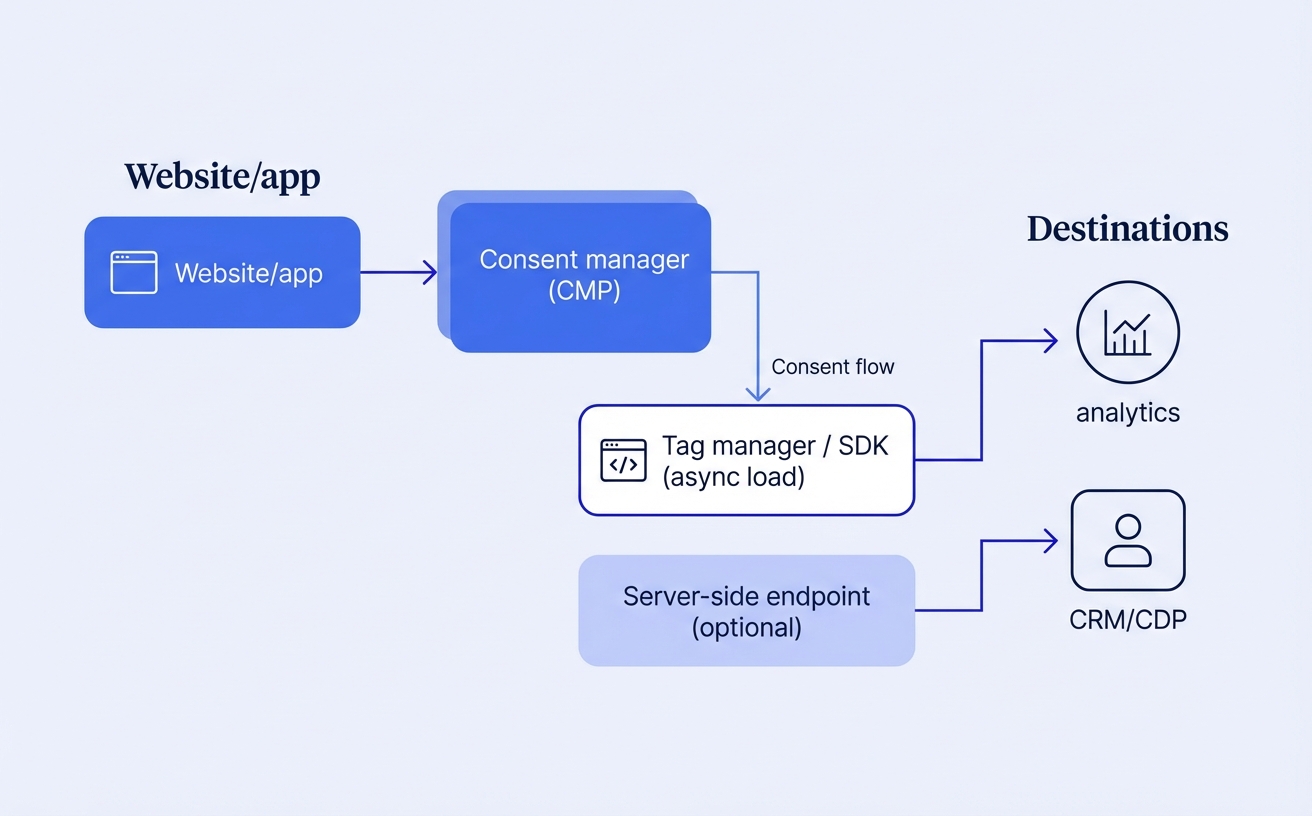
- Consent: fire marketing tags only after consent; keep essential measurement minimal and documented.
- PII controls: block/strip emails, phone numbers, and full names from event properties and query strings.
- Retention: set a default window (for example, 90–180 days) and shorten it for sensitive events to reduce risk.
Keep your site fast while you collect better data
Prioritize performance by reducing third-party scripts, loading tags asynchronously, and consolidating where possible, because every tag can hurt speed. If you need more reliable attribution as cookie behavior changes, consider a server-side layer so fewer requests happen in the browser, then use Radar to route only the signals you actually need from anonymous website traffic into your CRM and ad platforms.
Test on real pages, not just staging, because a fast homepage can hide slowdowns on high-intent pages like pricing, case studies, and your contact flow on an anonymous website visit.
How to measure ROI and avoid the 5 most common mistakes
Are you measuring website visitor tracking by “more data,” or by actions that change revenue outcomes?
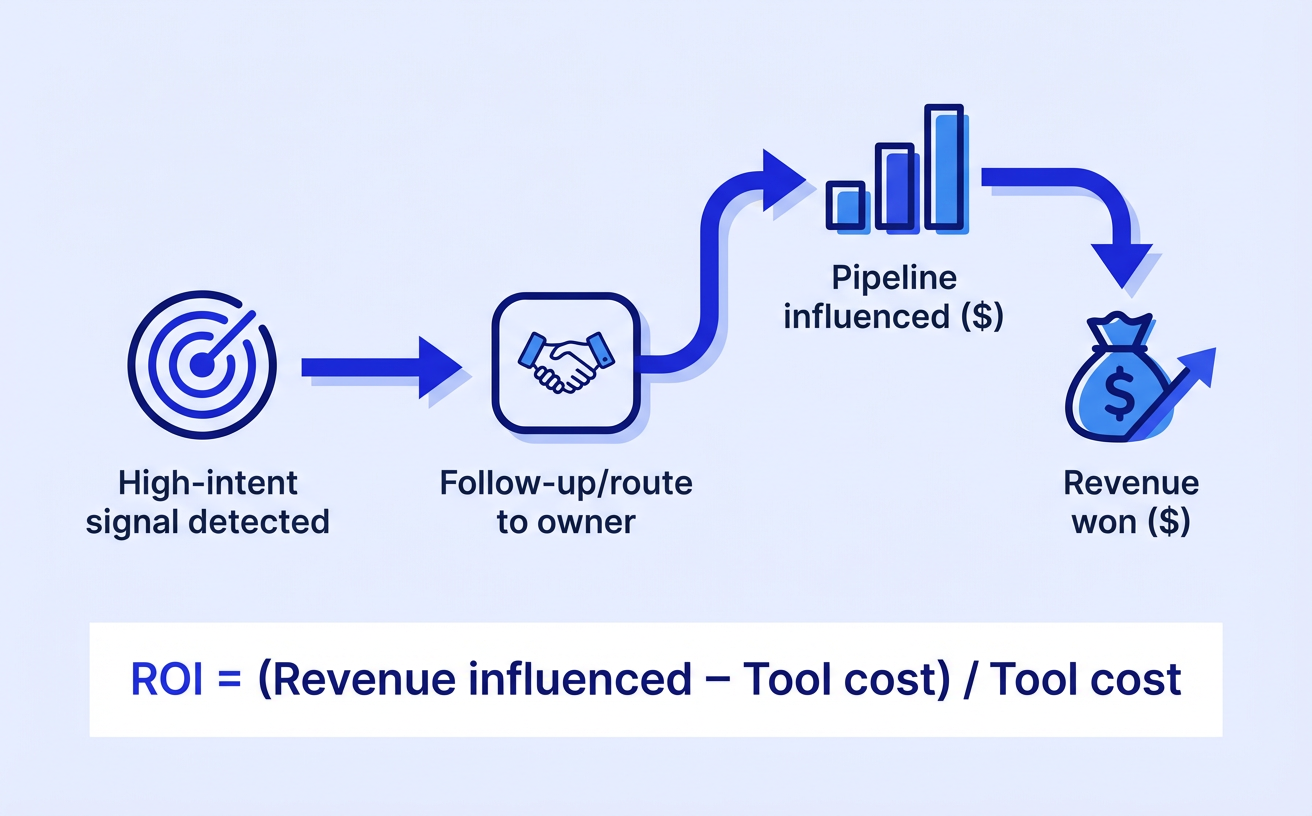
You’ll know your program is working when it reliably creates follow ups on high intent leads, removes missing attribution from key marketing channels, and improves conversions on pages where buyers actually decide. Tools like Radar help agencies turn anonymous visits into a workable list to identify leads and prioritize high value traffic without waiting for a form fill.
The ROI metrics that prove impact to stakeholders
Stakeholders care about business impact, so tie tracking directly to pipeline motion and efficiency, not dashboards. Start with a baseline, then measure deltas after you fix tracking and workflows.
- Incremental conversions from high-intent pages (pricing, demo, contact) after you act on behavior signals.
- Speed to first follow-up for identified accounts and qualified prospects (hours matter more than volume).
- Attribution coverage: % of sessions with clean utm parameters and a known traffic source.
- Cost per qualified prospect by channel once you suppress low-quality traffic and double down on what converts.
The 5 mistakes that quietly ruin tracking programs
The fastest way to waste cost is to collect data you can’t act on. These five issues usually hide until someone challenges effectiveness.
- Optimizing for visit volume instead of high intent leads and pipeline actions.
- Broken utm parameters (inconsistent naming, missing tags, redirects stripping UTMs).
- Ignoring identity + activation, so “identified” traffic never becomes outreach or retargeting.
- Over-collecting fields/PII, which increases privacy risk and lowers data quality.
- No QA on key flows (pricing → demo → thank-you), so attribution breaks where conversions happen.
A 30-day rollout plan that delivers quick wins
You get ROI faster when you ship a small, measurable loop, then expand. With Radar (or similar tools), focus on turning anonymous behavior into a daily action list your team can execute.
- Days 1–7: Audit UTMs, define 3–5 “high intent” page events, and set a baseline for conversion rate and speed-to-lead.
- Days 8–15: Launch identification + alerts for repeat visits, pricing views, and demo-start abandonments; assign owners for follow ups.
- Days 16–23: Activate audiences by traffic source (retargeting and email), and suppress low-intent segments to reduce spend.
- Days 24–30: Review wins, fix the biggest UX blocker found in recordings/paths, and expand to one new channel with consistent UTMs.
Pick a tool you’ll actually use
Match the tool to your goal and motion, then filter fast with a checklist of must-haves and deal-breakers. You’ll make a better decision by choosing the right category for your team’s data maturity and sales process instead of chasing “all-in-one” promises.
Prioritize insight plus activation, not just dashboards. The tools that win in 2026 combine analytics, behavior signals, and workflows that trigger action, like fixing UX blockers, routing high-intent accounts, or shortening sales cycles. For agencies, tools like Radar help turn anonymous traffic into qualified pipeline by identifying and prioritizing the visitors you already have.
Implement cleanly so you protect trust, keep the site fast, and avoid messy data. Next step: write your 10-point evaluation checklist now and book a 30-minute test using your top two tools (include Radar) on one high-traffic landing page.
Once you know which category matches your stack, the next step is comparing real-world options side by side, this list of visitor tracking software makes that decision much easier.